Project
←Back to projects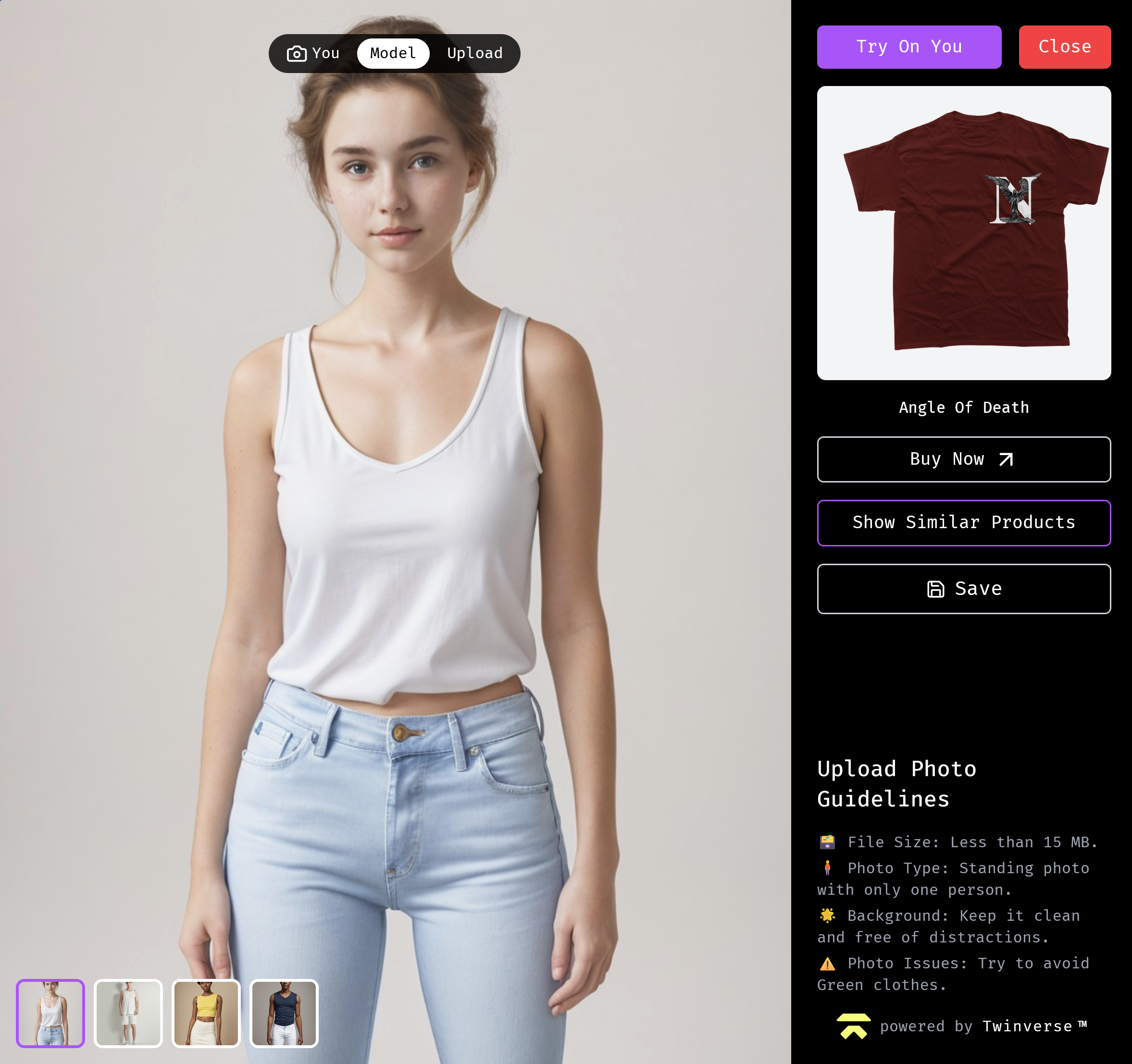
february 11, 2025
Tryon Modal
TwinTry — AI Virtual Try-On Module
A production-grade virtual try-on experience that lets shoppers see how garments look on their own body — via live webcam or uploaded photo — before committing to a purchase. Powered by the Twinverse AI inference engine and built on React Router v7, TwinTry eliminates the visualization gap that drives return rates in online fashion retail.
Overview
The fundamental problem with online apparel shopping is that garment fit and appearance are invisible at purchase time. Standard product photography shows clothes on a single model at a single body configuration. Customers compensate by ordering multiple sizes, picking the best fit, and returning the rest — a pattern that drives return rates of 20–40% in fashion e-commerce and generates downstream logistics and environmental costs for every store that ships clothes.
TwinTry addresses this by embedding a full try-on experience directly in the shopping interface. No separate app, no account creation, no navigation away from the product. The shopper captures a selfie or uploads a photo, the Twinverse AI inference engine composites the selected garment onto their image, and the result is displayed within the same session — with a recommendation engine surfacing related products alongside.
Architecture
TwinTry is a React single-page application served via React Router v7's file-based routing. The application boundary is narrow by design: the client handles all capture, preview, and display logic; the Twinverse AI V1 API handles inference. This separation means the frontend remains fast and portable regardless of model complexity on the backend.
Browser Session
   │
   ├── Webcam Capture (react-webcam + smart timer)
   │     └── 5s / 10s / 15s countdown → frame capture
   │
   ├── Photo Upload (FileReader API)
   │     └── client-side preview → compressed payload
   │
   ├── Model Selection
   │     └── professional model catalogue → swap subject image
   │
   └── Twinverse AI V1 API
         ├── Garment + subject image → inference request
         ├── Optimized image compression (pre-flight)
         └── Result composite → display + recommendation engine
Browser Session
│
├── Webcam Capture (react-webcam + smart timer)
│ └── 5s / 10s / 15s countdown → frame capture
│
├── Photo Upload (FileReader API)
│ └── client-side preview → compressed payload
│
├── Model Selection
│ └── professional model catalogue → swap subject image
│
└── Twinverse AI V1 API
├── Garment + subject image → inference request
├── Optimized image compression (pre-flight)
└── Result composite → display + recommendation engineReact Router v7 (the successor to Remix) provides the routing layer, with loader/action patterns keeping data fetching colocated with route components. Vite 5 handles bundling, delivering fast HMR during development and optimized production assets with tree-shaking and code splitting. Motion (Framer Motion) drives all state transitions — modal opens, result fade-ins, and loading states — without custom animation loops.
Key Features
- Live webcam try-on — real-time camera feed via
react-webcam, with 5, 10, and 15-second smart timers for hands-free selfie capture - Photo upload path — FileReader API generates a client-side preview before any upload occurs, keeping the UI responsive during large file selection
- Multi-model visualization — a catalogue of professional models allows shoppers who prefer not to upload personal photos to still experience accurate fit visualization
- Recommendation engine — inferred results are accompanied by similar products and personalized suggestions, extending time-on-page after a successful try-on
- Save and share — results are downloadable for personal reference or social sharing, creating organic product discovery outside the store
- Optimized image compression — payload size is reduced client-side before submission to the inference API, minimizing round-trip latency without degrading output quality
Implementation Details
Why React Router v7
React Router v7 (formerly Remix) was chosen over a plain SPA setup because its loader/action model co-locates data dependencies with the routes that consume them. This keeps the try-on flow's state management explicit and eliminates the prop-drilling common in multi-step modal UIs. Server-side rendering capability is available if the product is later embedded in a server-rendered storefront, without requiring an architecture change.
Why Twinverse AI Instead of a Direct Model Integration
Integrating a garment try-on model from scratch would require curated training data, GPU inference infrastructure, and a dedicated ML serving layer — none of which are appropriate scope for a client-facing shopping module. The Twinverse AI V1 API exposes a single endpoint that accepts subject and garment images and returns a composited result, shifting the engineering challenge from model operations to API integration and UX design. The inference quality is consistent and the API contract is stable, allowing the frontend to evolve independently.
Webcam Capture and Timer Architecture
The smart timer is not a simple delay before snapshot — it allows the user to position themselves correctly before capture fires. Three fixed intervals (5s, 10s, 15s) cover different use cases: quick capture for users already in position, longer intervals for users adjusting clothing or lighting. The react-webcam component provides direct access to the video stream and frame capture API, keeping the implementation dependency-light while maintaining precise control over frame selection.
Image Compression Before Inference
Sending raw camera frames or full-resolution uploads to the inference API would introduce unnecessary latency. A compression pass runs client-side before the payload is constructed — reducing file size while preserving the resolution needed for accurate garment compositing. This optimization is transparent to the user but measurably reduces time-to-result for users on constrained connections.
Tech Stack
| Component | Technology | Rationale |
|---|---|---|
| Framework | React Router v7 | File-based routing with loader/action patterns; Remix successor with SSR optionality |
| UI Library | React 19 | Concurrent rendering, stable API, first-class hooks for capture state management |
| Build Tool | Vite 5 | Sub-second HMR, native ESM, production tree-shaking and code splitting |
| Styling | Tailwind CSS v3 | Utility-first approach eliminates style collision risk in embedded contexts |
| Animations | Motion (Framer Motion) | Declarative animation API with GPU-accelerated transitions; no custom loops |
| Camera | react-webcam | Direct MediaDevices API access with a stable React abstraction layer |
| AI Inference | Twinverse AI V1 | Managed inference endpoint; removes GPU infrastructure and model training from scope |
TwinTry demonstrates that the hard problem in virtual try-on is not the AI — it is the capture-to-result UX loop. Getting the selfie timer, compression, model selection, and result display to feel instantaneous and trustworthy is where the engineering effort actually lives.