Essay
←Back to blogHikariPlay: I Reinvented Netflix Because I Own Three Movies on Google Drive
Google Drive is a folder. Netflix is a subscription. I turned one into the other using Svelte 5, GSAP, a handful of public APIs, and an alarming amount of typography opinions. No accounts, no tracking, no buffering excuses.
HikariPlay: I Reinvented Netflix Because I Own Three Movies on Google Drive
"Streaming services rent films the way restaurants rent forks. HikariPlay is just the dining room you already had — with the lights done right."
That quote is from my own app's landing page. I wrote it. About my own app. While the app was being built. This is the level of delusion we are operating at.
Let me be very clear about what happened here.
I had a Google Drive folder. It contained some video files. These files played fine in VLC. They played fine in the browser via a direct link. The problem — the devastating, sleep-depriving, week-consuming problem — was that they did not play in a bespoke private cinema interface with cinematic serif typography, an automatically-fetched poster from AniList, and a scrolling ticker tape of catalogue numbers.
A tragedy. I had no choice.
The Threat Model
Let's establish who HikariPlay is for: me, and three other people in my household who are emphatically not going to configure a Plex server, memorize a port number, or hear the words "transcoding queue" ever again.
Netflix costs money every month for content I mostly don't want. Plex requires a server, media scanning, a library daemon that occasionally decides everything is the wrong show, and a paid Pass for features that should not be paywalled. Jellyfin is Plex's open-source twin and shares all the same complexity at a 40% discount in stability.
The actual problem I was solving: I own some video files. I want to watch them from the couch without dragging a cable across the room. I want posters. I want "resume where I left off."
The actual solution I built: a full SvelteKit application with a Google Drive indexer, two external poster APIs, an IndexedDB resume-position tracker, a VLC handoff mechanism, and a landing page that would not look out of place at a film festival.
I am a reasonable person.
How the Indexing Works (It's Embarrassingly Simple)
Here is the entire secret behind HikariPlay's "catalogue":
You give it a public Google Drive folder ID. That's it. That's the setup process. The SvelteKit server walks the Drive folder tree recursively — up to six concurrent page-fetches via a hand-rolled pLimit(6) concurrency limiter because apparently adding a tiny npm package was too easy — reads every filename, and parses them into titles, years, seasons, and episodes using a filename parser that handles SxxExx, NxNN, (Year), and a kill-list of 30+ scene release tags like WEB-DL, DDP5.1, and HEVC. Because real media filenames look like Zootopia.2.2025.2160p.WEB-DL.DDP5.1.x265.mkv and the app is going to show a tasteful serif title card regardless.
This is either elegant minimalism or structural laziness dressed in a trench coat. The line is thin.
Content types are exactly two: anime and movie. Not anime | film | series | short | documentary | director-cut-extended-imax. Two. The type controls which poster API gets tried first. That's the entire purpose of the type field. The catalogue is sorted by folder path then filename — which is also either elegant or lazy, and which also does not matter, because the gallery has a Fuse.js fuzzy search with a 0.35 threshold that means you can typo the title and still find it.
The Poster Pipeline, or: "Why Are You Calling Two Different APIs?"
AniList has better anime metadata and higher-quality poster images than OMDb. OMDb has better film and TV metadata. Neither covers everything.
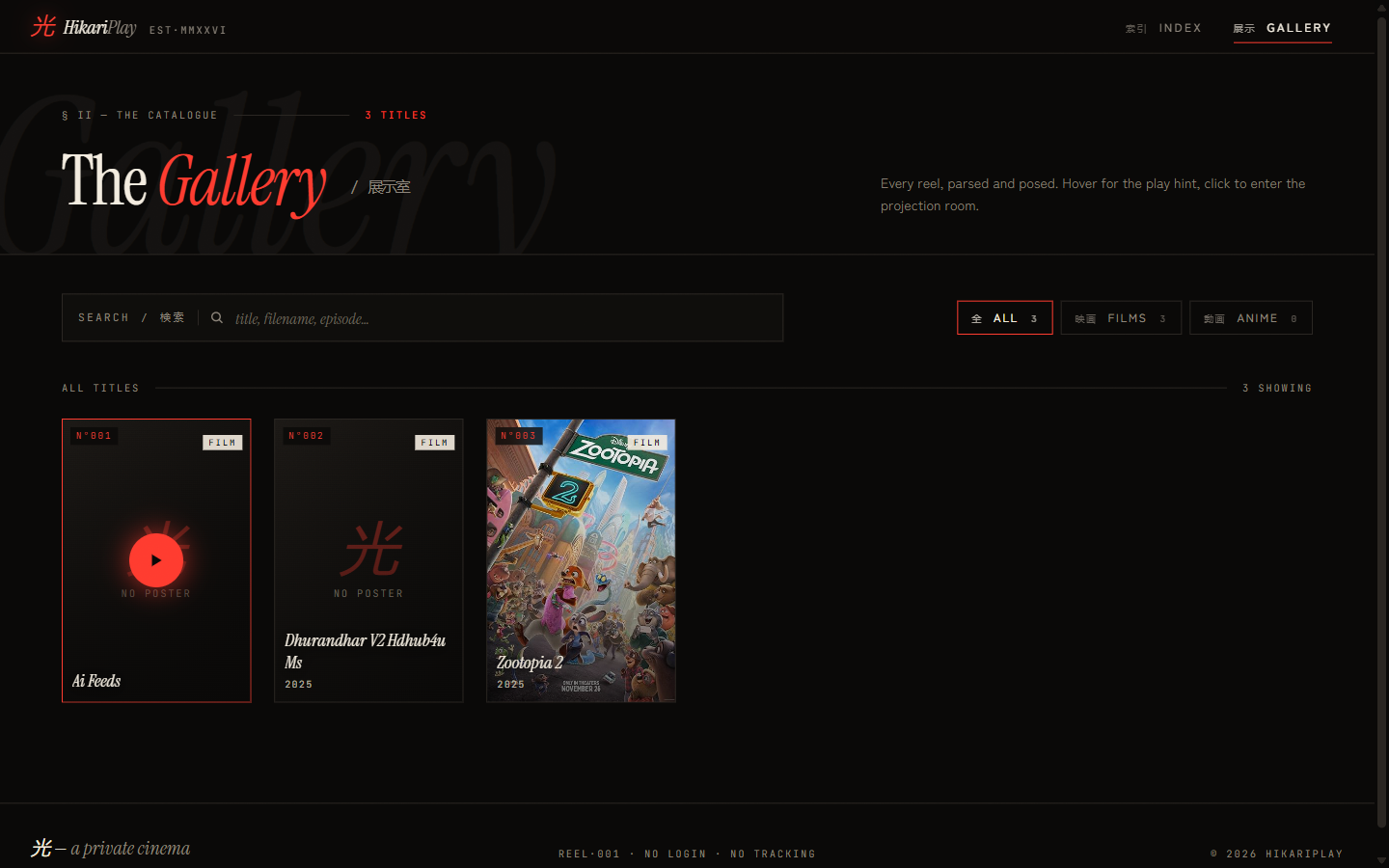
The resolution strategy: try AniList first (if type is anime). If the title matches and a poster URL comes back, use it. If AniList returns nothing, try OMDb. If OMDb returns nothing, fall back to the Drive file thumbnail. If that also fails, render the kanji placeholder.
This is a four-step fallback chain for what is fundamentally a JPEG. I am not sorry. The alternative is showing a blank grey square for "Dune: Part Two" and that is not acceptable.
The poster resolution result is cached in two places simultaneously: the server holds an in-memory Map with a 24-hour TTL so hot requests don't re-hit the external APIs. The client stores the result in IndexedDB with a 30-day TTL via the idb library so posters survive a server cold start without flickering. The client tries IndexedDB first, calls /api/poster on a miss, writes the result back. The server responds with a cache-control: public, max-age=86400, stale-while-revalidate=604800 header. Everyone is caching this JPEG. Nobody will ever see a loading state twice.
The Player, Which Is Just a <video> Tag Talking to a Proxy
The video player is a standard HTML5 <video> element. There is no custom media engine. There is no transcoding. There is no adaptive bitrate streaming.
However — and here is the detail that cost me a day — the browser cannot hit the Drive URL directly. Google Drive's short-lived download tokens are bound to the server session that fetched the confirmation HTML. If you redirect the browser straight to the resolved URL with its own cookies and session, Drive returns a 403. So all video traffic is proxied byte-for-byte through the SvelteKit server, which pipes the upstream response while forwarding content-type, content-length, content-range, accept-ranges, and Range request headers for seek support.
The stream resolver has two strategies: first it tries the authenticated Drive API endpoint (alt=media with the API key), which has a much higher quota and doesn't trigger the antivirus interstitial. If that fails, it falls back to the public /uc?export=download URL, parses the HTML confirmation page for the uuid/at tokens, and uses those. This is the kind of implementation detail you only understand by encountering a 403 at 1am.
If your browser can play the codec, it plays. If it can't — welcome to the VLC handoff.
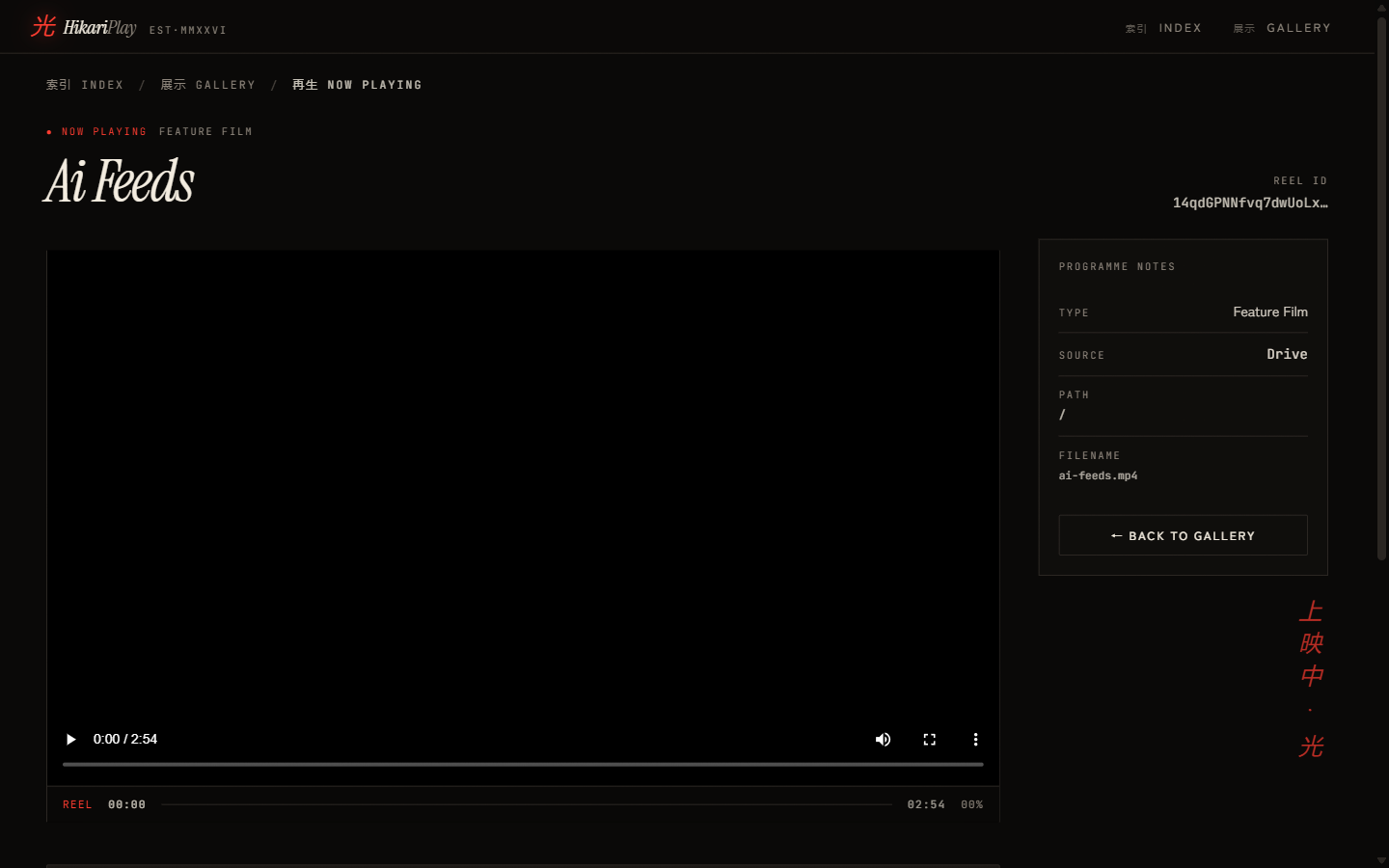
The right panel shows "Programme Notes" because I am a deeply committed person. It displays the reel type (Feature Film, Anime, etc.), the source (Drive), the folder path within Drive, and the filename. The back button says "← BACK TO GALLERY." The floating vertical text on the right reads "上映中" — "Now Showing" in Japanese.
I did this for an app that at time of launch had exactly three entries in the catalogue. Zootopia 2, something with "V2 Hdhub4u" in the filename that should probably not be discussed further, and a short film I made.
The VLC Handoff: Engineering a Solution to a Problem Every Decent Video Player Already Solves
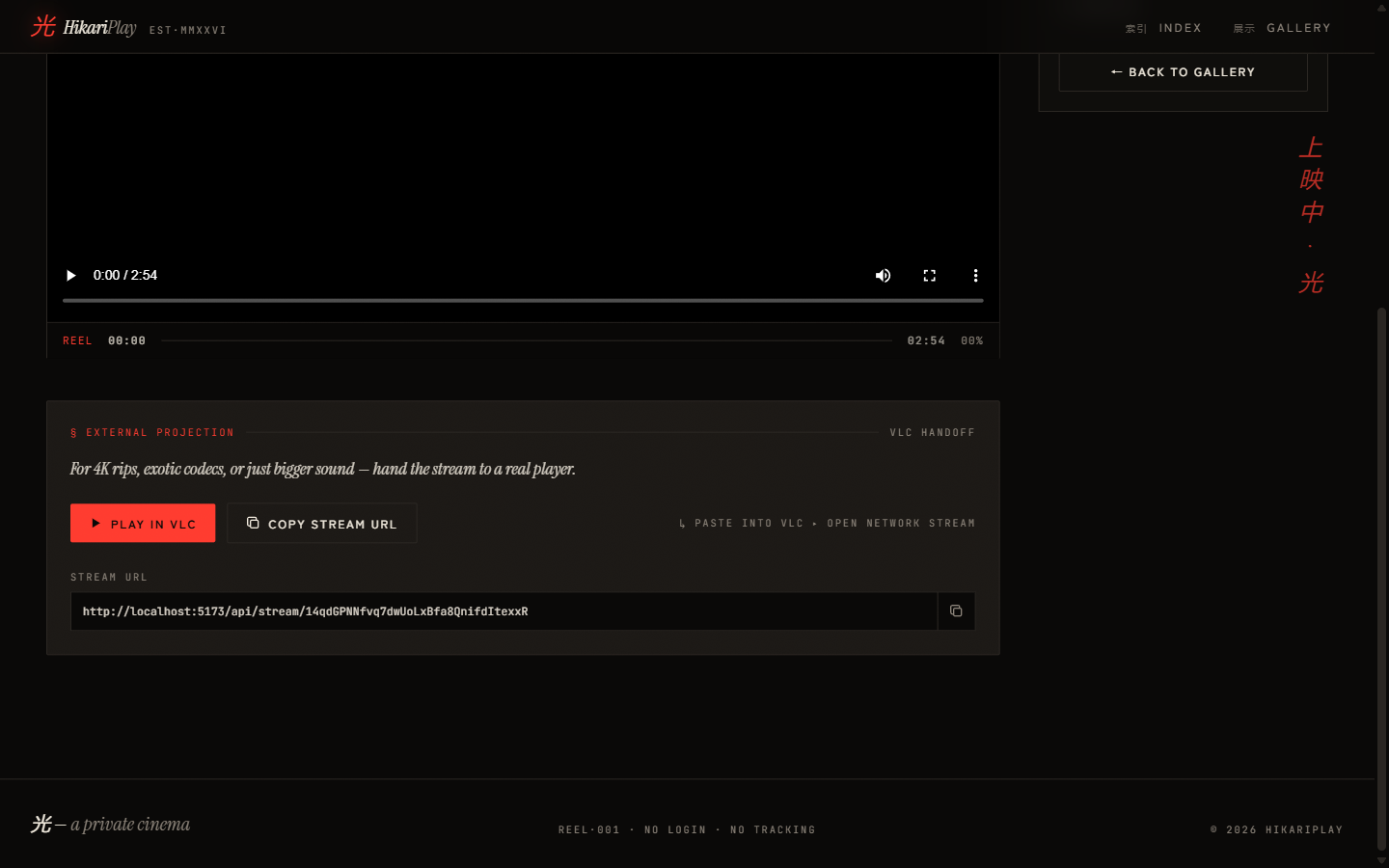
Some files refuse to play in a browser. H.265 main profile. DTS audio. Anything encoded with flags that Chrome politely declines. For these, HikariPlay offers the "External Projection" panel.
The panel presents:
- A PLAY IN VLC button that constructs a
vlc://protocol URL and clicks it - A COPY STREAM URL button that copies the raw Drive stream URL to clipboard
- The raw URL displayed in a monospace input field with a copy icon
You open VLC. You paste the URL into Open Network Stream. You watch your movie at full quality with the correct codec. The instructions helpfully say "L PASTE INTO VLC · OPEN NETWORK STREAM." The capital L is not a typo. It is a design choice.
Is this equivalent to just copying a Google Drive link and opening VLC? Yes. Does having it inside a bespoke cinema interface make it feel significantly more intentional? Also yes. This is the entire premise of HikariPlay.
The "Resume Where You Left Off" Feature, Which Has No Server
Here is where the architecture gets genuinely interesting rather than just typographically ambitious.
"Continue Watching" is powered entirely by localStorage in the browser under the key hp:cw. No accounts. No server writes. No backend tracking. Playback position is serialised to a JSON record on pause, visibilitychange, and beforeunload. When you return to a film, the player reads the stored offset and seeks to it before playback begins.
The resumable threshold: more than 5 seconds in, less than 95% complete. Hit 95% and the entry is still there but the gallery won't show a "resume" indicator — you've seen the film, no need to resume the credits.
The implementation is a plain TypeScript module (continueWatching.ts) with getAllEntries, saveProgress, clearEntry, and isResumable — each reading and writing the same localStorage key. A Svelte 5 $state class (cwStore) wraps it so the gallery reactively updates its "Continue Watching" row without any subscriptions or observables.
This means:
- Resume works completely offline
- Resume requires no login
- Resume is isolated per device and browser, by design
- Resume data cannot be subpoenaed because it does not exist on a server
The feature sheet on the landing page calls this "no telemetry — just a bookmark in time." That sentence is doing a lot of work. I am proud of it.
The Features Section Has More Design Than My Previous Four Projects Combined
Let me talk about the landing page, because the landing page deserves to be talked about.
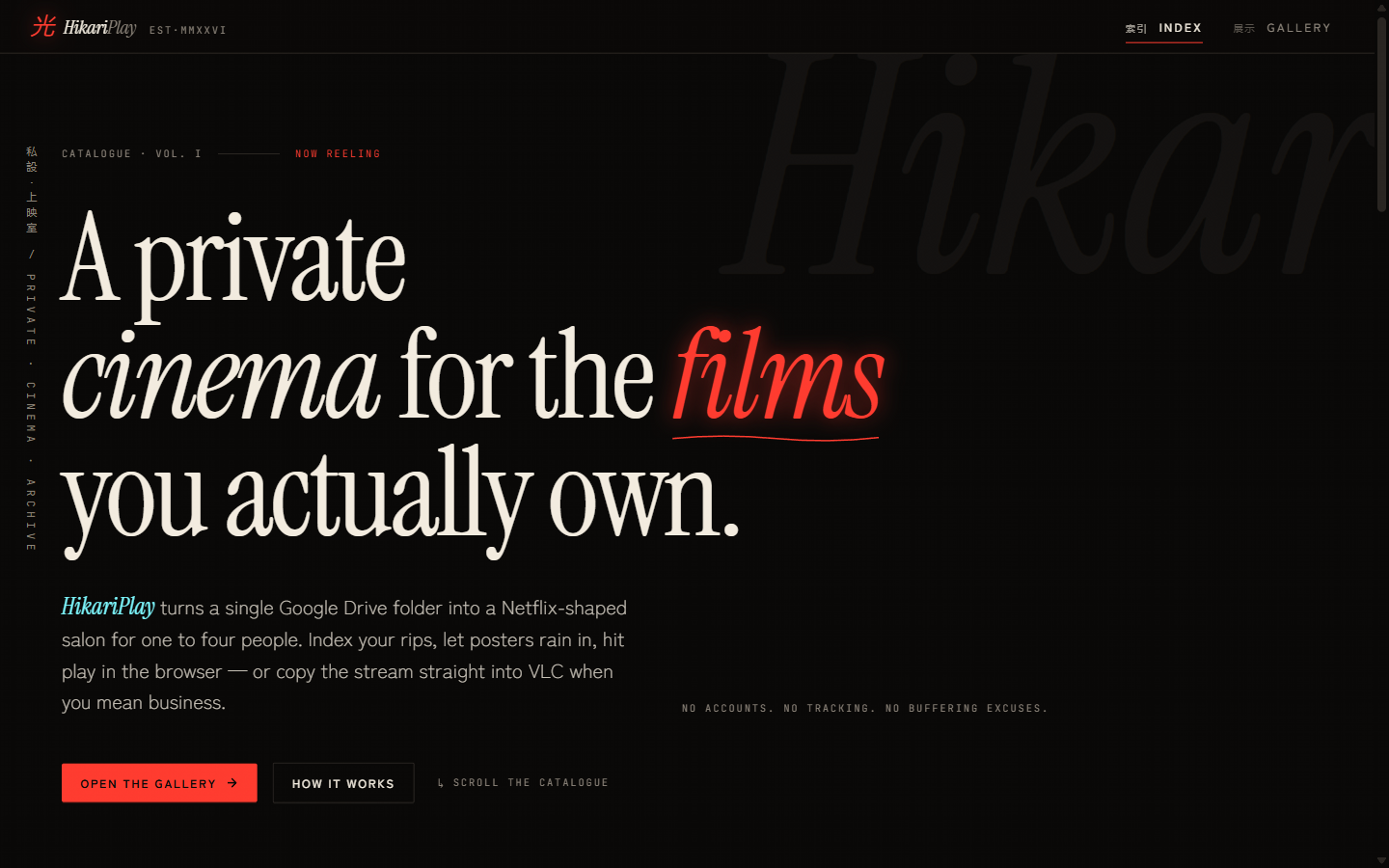
It is black. The typography is a serif/sans-serif editorial split that I spent an embarrassing amount of time calibrating. The hero headline reads "A private cinema for the films you actually own." The word cinema is in italic. The word films is in red italic. "You actually own" is the implied critique of Netflix.
There is a scrolling ticker tape at approximately 30% viewport height that runs cinema-adjacent words in uppercase spaced tracking: HIKARI, TOKYO REEL, MIDNIGHT SCREENING, SAISEI, ARCHIVE, 24 FPS, DRIVE STREAM, NO LOGIN. It scrolls left continuously. It serves no functional purpose. I added it at 11pm and have felt nothing but satisfaction since.
The landing page runs GSAP 3 with ScrollTrigger for all its entrance animations: feature cards stagger in, the manifesto section scrub-reveals word by word as you scroll, the spec sheet rows slide in from the left with 80ms stagger, the final CTA scales up from 0.92. The hero device element has a parallax offset of 0.15. These are not lazy CSS animation: fadeIn. They are carefully tuned gsap.from() calls with power3.out easing, wrapped in gsap.context() and cleaned up on onDestroy. This is the appropriate amount of effort for a video player for four people.
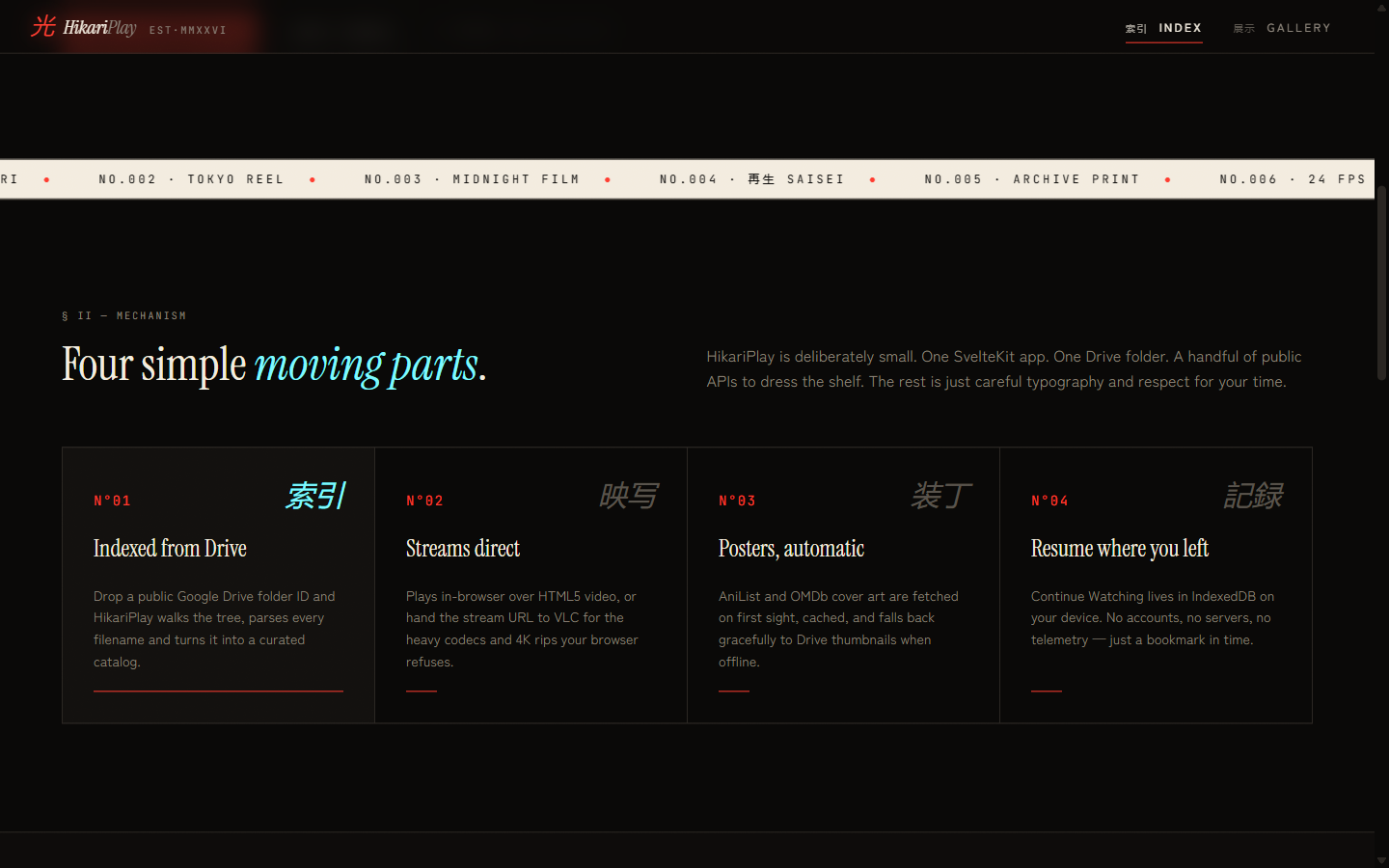
The features section has four cards in a grid. Each card has:
- A number in red (
N°01,N°02, etc.) - A title in serif
- A kanji word in the upper right corner in a lighter weight
- A description
- A short horizontal rule at the bottom
The kanji words are: 索引 (Index), 映写 (Projection), 装丁 (Binding/Design), 記録 (Record). None of these are visible to users who don't read Japanese. This is not a problem. It is a vibe.
The Manifesto Section, Because Every Private Video Player Needs a Manifesto
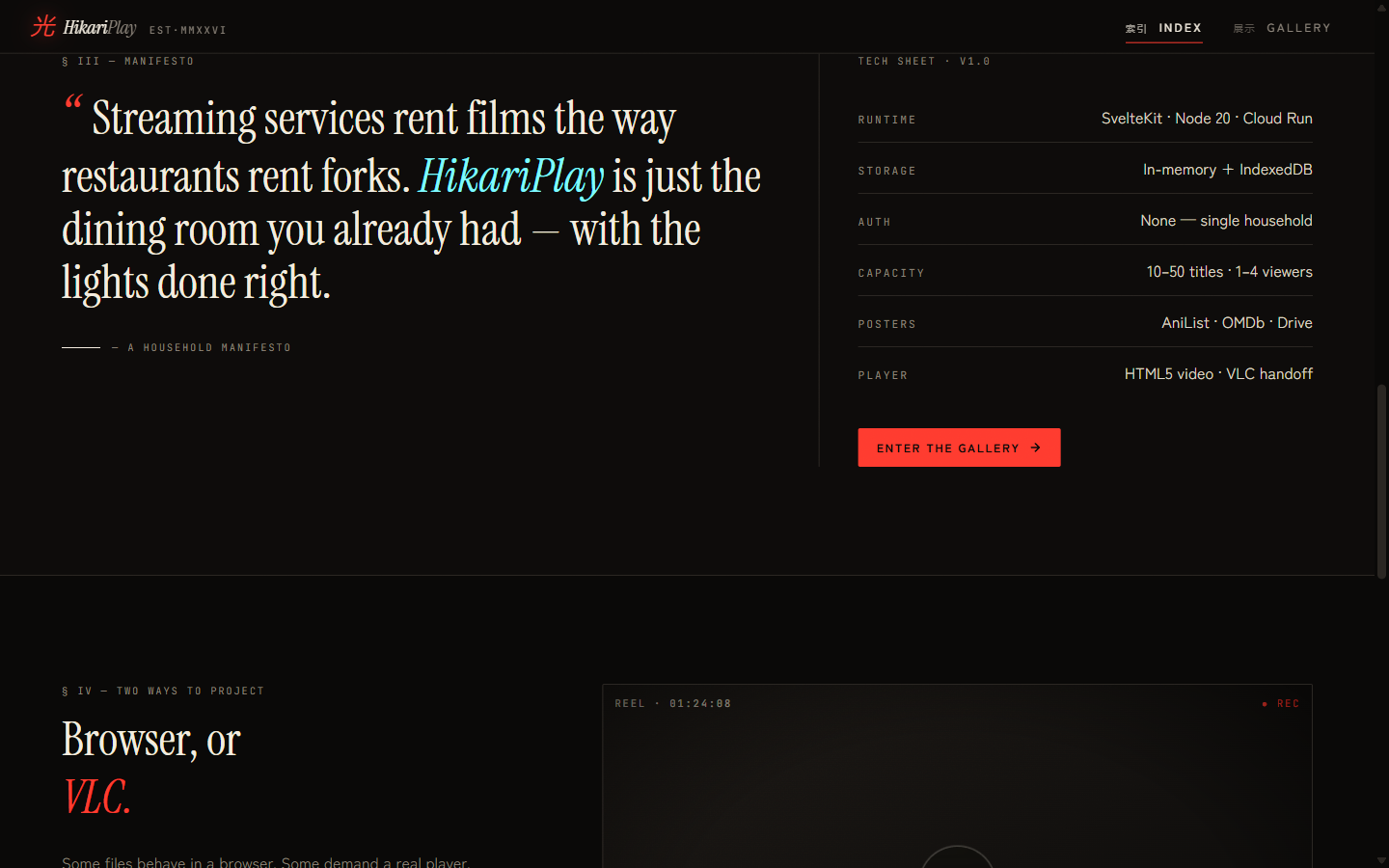
Section three of the landing page is a manifesto. I wrote a manifesto. For a video player.
"Streaming services rent films the way restaurants rent forks. HikariPlay is just the dining room you already had — with the lights done right."
On the right side of the manifesto section is a tech sheet formatted as a table with labels in spaced uppercase: RUNTIME, STORAGE, AUTH, CAPACITY, POSTERS, PLAYER. The values are: SvelteKit · Node 20 · Cloud Run, In-memory + IndexedDB, None — single household, 10–50 titles · 1–4 viewers, AniList · OMDb · Drive, HTML5 video · VLC handoff.
"None — single household" for AUTH is my favorite line in any documentation I have ever written.
The Capacity Field Says "1–4 Viewers" and I Stand By This
"10–50 titles · 1–4 viewers."
Not because SvelteKit can't handle more. Not because Google Drive has a hard cap. Because this is genuinely a household cinema tool. It is not Plex. It is not Jellyfin. It is not meant to be used by fifty people concurrently streaming different content.
It is meant for one person on the couch, or two people deciding what to watch, or four people for movie night. Beyond that you're running a screening room and you should probably have a server rack.
Designing software with an honest capacity model is something I find more interesting than designing software that claims to scale to infinity and then fails at twelve.
What I Actually Learned
The Drive API's public folder access is straightforward for read operations but requires careful URL construction for streaming — particularly the &confirm=t bypass for large files that trigger Google's antivirus warning page. Getting that right the first time saves a day.
In-memory catalogue state on a stateless Cloud Run instance means every cold start re-fetches the Drive tree. For a 10–50 title catalogue this is fast enough to not matter. For a 500-title catalogue it would be noticeably slow. The architecture is honest about its intended scale.
The VLC protocol URL (vlc://) requires VLC to be registered as a URL handler on the OS. On macOS this works automatically with a VLC install. On Windows it requires enabling it during install. This is documented in the UI with exactly zero user-facing warnings, which is consistent with the overall philosophy that the audience of this app knows what VLC is.
The Numbers
- 1 Google Drive folder ID required to run the entire application
- 2 external poster APIs with a 4-step fallback chain
- 2 cache layers per poster: 24h server in-memory Map + 30-day client IndexedDB
- 10 minutes — server-side video list cache TTL before a Drive re-walk
- 0 accounts, 0 tracking, 0 backend database writes for playback state
- localStorage — where your continue-watching data lives, not the cloud
- 30 scene release tags the filename parser knows to strip before showing you a title
- 6 concurrent Drive API page-fetches from the hand-rolled concurrency limiter
- 3 films in the catalogue at time of first public screenshot
- 1 of those films has "Hdhub4u" in the filename
- Infinite scrolling ticker tape that serves no purpose except being correct
HikariPlay is what happens when you have a Google Drive folder, strong typography opinions, and the knowledge that the default browser video player has no sense of occasion.